Certification
The certification process verifies the accuracy and compliance of all transactions within a billing cycle.
PCard Certification Prerequisites:
- All transaction modifications completed.
- All funding allocations verified.
- Billing cycle status: Closed.
- All supporting documentation attached.
Step-by-Step Certification Instructions:
- Access Certification Screen:
- Navigate to the billing cycle view.
- Verify that all transactions appear correct.
- Initiate Certification:
- Locate the "Certify" button at the bottom of the screen.
- Click to begin the certification process.
- The system displays the certification disclaimer.
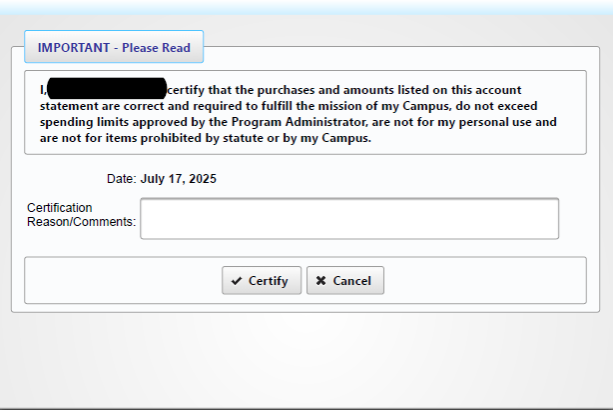
Review Disclaimer:
-
- Read the entire certification statement.
- Review cardholder responsibilities.
- Verify understanding of terms.
- Confirm policy compliance.
Comment Section Guidelines (if applicable):
-
- Document policy exceptions.
- Explain unusual purchases.
- Note business justifications.
- Record special circumstances.
- Reference relevant approvals.
Final Certification:
-
- Review entered comments.
- Click the "Certify" button.
- The system processes certification.
- Transactions become a permanent record.
- A confirmation screen appears.
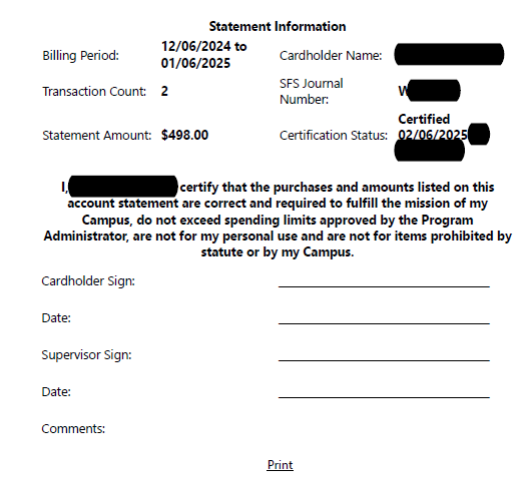
Post-Certification Revision Process:
- Initiate Changes:
- Select the "Uncertify" option.
- The system unlocks certification.
- Modification Steps:
- Make required adjustments.
- Review updated information.
- Verify the accuracy of changes.
- Review Status:
-
- The system displays the revised certification status.
- Confirm changes recorded.
- Verify new status indication.
- Records are archived in the system.
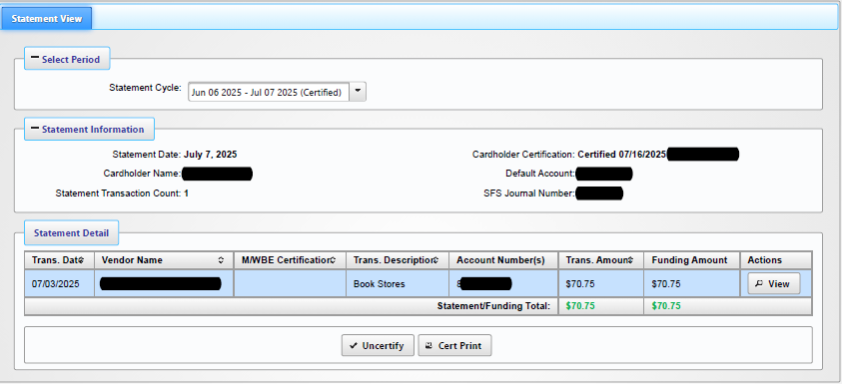
Post Certification
After online certification, physical documentation must be submitted.
- Obtain Authorization:
- Secure supervisor signature.
- Supervisor signature is required on all certifications.
- Submit Documentation:
- Attach the signed certification page.
- Include all supporting materials.
- Confirm package completeness.