Mandatory Ethics Training
By Department of Human Resources | Jan 6, 2026
Announcing January dates
The new year means the state’s mandatory Annual Ethics Training is once again required for all state-paid employees.
Which training do you need to take?
- If you did not receive training last year, you must take live Ethics training now to satisfy your 2025 requirement. Then later in 2026, you will also need to take the Ethics Refresher.
- Live training is taken online via COELIG, or occasionally in-person on Downstate campus (dates coming soon).
- If you took your live CETC Ethics training in 2025, you’re eligible to take the Online Ethics Refresher Training. It’s required for everyone on alternating years, opposite live trainings.
- This is taken online via COELIG.
Confused?
Ethics Training is a yearly requirement. That means that completing an overdue training for the 2025 calendar year now does not satisfy both 2025 and 2026 requirements.
Think of it this way: Ethics training is like filing your federal income taxes.
If you’re overdue to file your 2024 taxes, you still have to file your 2025 taxes.
Online Ethics Training:
COELIG is hosting online trainings throughout January.
Find instructions to register yourself below. (We cannot do this for you).
January 2026 online trainings:
- Tuesday, January 6th from 10 am to 12 pm
- Wednesday, January 7th from 2 to 4 pm
- Thursday, January 8th from 1 to 3 pm
- Tuesday, January 13th from 10 am to 12 pm
- Wednesday, January 14th from 2 to 4 pm
- Thursday, January 15th from 1 to 3 pm
- Tuesday, January 20th from 10 am to 12 pm
- Wednesday, January 21st from 2 to 4 pm
- Thursday, January 22nd from 1 to 3 pm
- Tuesday, January 27th from 10 am to 12 pm
- Wednesday, January 28th from 2 to 4 pm
- Thursday, January 29th from 1 to 3 pm
To register for training, please click
and scroll down to Enrollment Information
Enrollment Information
Enroll Now Using Our Self-Enrollment Class Registration Portal
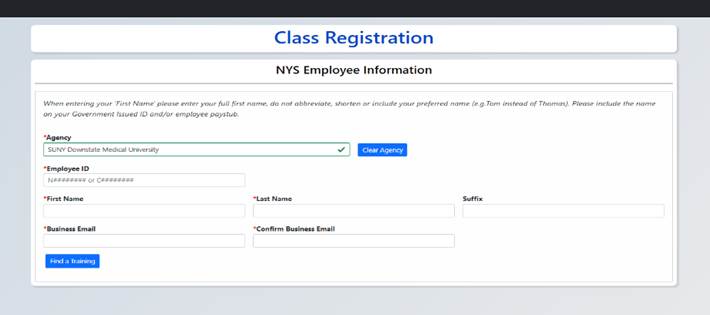
Complete the fields in the screenshot below. Please read these instructions to avoid errors:
1. Agency: type “Downstate,” wait a moment, and click on SUNY Downstate (a white box will pop up).
2. Employee ID: Enter your “N” number.
- You can find your N number on your paystub.
- Alternatively, log into the SUNY Secure “Employee Services Portal” at this link
- Then click “Human Resource Systems” at this link:
SUNY HR Portal - Your NYS ID N number is displayed at the top right, under your SUNY ID.
- Example: NYS ID N04219547
3. Enter First and Last name.
4. Enter your Downstate email address.
- Your work email address is required to ensure you receive credit.
- Do not enter your personal email address.
5. Select a date from the menu by clicking “Find a training.”
You must attend the entire session by logging on at the start time and using the email you registered with.
Late arrivals will not receive credit for attendance.
Please be advised this virtual training is not offered through the Department of Human Resources.
Therefore, we will not be able to assist with login issues, etc.
Thank you.